Need a transparent background? Choose PNG, not JPG
Updated:
Logos, stickers, product cutouts, and UI assets often use a transparent background. If you convert them to JPG, those see-through pixels become a solid color. That is a format limit, not a bug in the converter.
What “transparency” actually means
Transparency (an alpha channel) stores how opaque each pixel is. Soft edges around a logo, drop shadows, and hollow centers all rely on it. Formats that keep alpha can composite cleanly over any page background later.
When alpha is discarded, something must replace those pixels—usually white, black, or a color you choose. Edges that looked smooth on a checkerboard preview can suddenly show a hard matte.
Formats that keep alpha on WebP.Best
PNG, WebP, and AVIF can store transparency. Converting among them on WebP.Best typically preserves the transparent background for static images. That is the path for brand marks, icons, and stickers you still need to overlay later.
WebP is useful when you want smaller files for the web and still need alpha. PNG remains the safest handoff for designers and printers who have not adopted WebP. AVIF can also keep alpha but support in older software is thinner—know your destination.
- Keep editing / overlay later → PNG or WebP with alpha
- Modern website delivery → WebP or AVIF often wins on size
- Maximum “everyone can open it” for graphics with holes → PNG
Why JPG cannot keep transparency
Classic JPEG has no alpha channel. It stores color for a rectangular image. Any converter that outputs JPG must flatten transparent pixels onto a background first. On WebP.Best that background is configurable so the matte looks intentional instead of a surprise.
If a form or Office workflow insists on JPG, flattening is the correct trade-off. Do not expect “transparent JPG”—that format does not exist in mainstream use.
How WebP.Best helps you avoid surprises
When you load files that contain transparency, the converter warns you before a JPG export. Choose a background color (white for documents, black for dark slides, or a brand color) or switch output to PNG in one click.
Silent white-fill is the usual reason a logo suddenly gets a hard box around it. The warning lets you pick the matte on purpose instead of discovering it after download.

JPG or PNG? Pick by what you need
Photos of people, food, or landscapes: JPG is usually fine—there is no meaningful transparency to keep, and file size drops. Product shots already cut out on a transparent canvas: stay on PNG/WebP unless a buyer portal forces JPG.
If you must deliver JPG from a transparent WebP, export once with the correct matte, then keep the transparent master. Do not overwrite your only alpha-capable original.
- See-through pixels needed → PNG / WebP / AVIF
- Photo for Word, email, print portal → JPG + sensible quality
- Forced JPG from a logo → pick background color, keep a PNG master
Quality, file size, and resizing before upload
PNG is lossless here—the quality slider does not apply. JPG trades sharpness for smaller files: raise quality for print proofs, lower it for chat drafts.
If a portal rejects your file for size, open Advanced options on the homepage before converting. Most people only need Size → Longest edge (for example 1920). Exact width × height is for forms that demand a fixed box such as 1080×1080—then pick Fit inside to keep the whole logo, or Fill and crop when the site crops avatars.
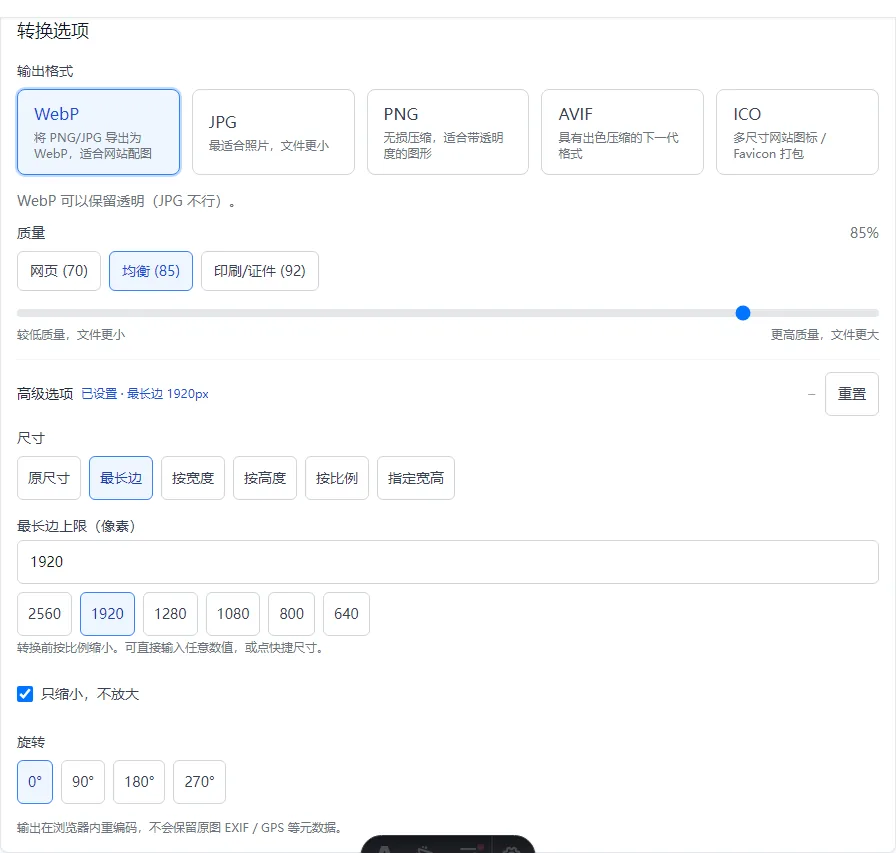
- Transparent logo still too big → PNG + Longest edge 1920 (or whatever the form allows)
- Forced JPG from a transparent WebP → pick background color first, then set quality
- Square avatar required → Exact width × height, usually Fill and crop for photos or Fit inside for full logos
FAQ
Can JPG have a transparent background?
No. Mainstream JPG has no alpha. Use PNG or WebP if you need see-through pixels.
Will WebP to PNG keep transparency?
For typical static WebP with alpha, yes on WebP.Best. Always spot-check soft edges after download.
My JPG logo has a white box—what happened?
Transparent pixels were flattened onto white (or another matte). Re-export as PNG, or re-export JPG with a background that matches your slide or page.
Should I use AVIF for transparent logos?
Only if every place that must open the file supports AVIF. Otherwise prefer PNG for handoff and WebP for modern web delivery.